2.4.5 DBMS Monitoring: Connections
Number of DB connections
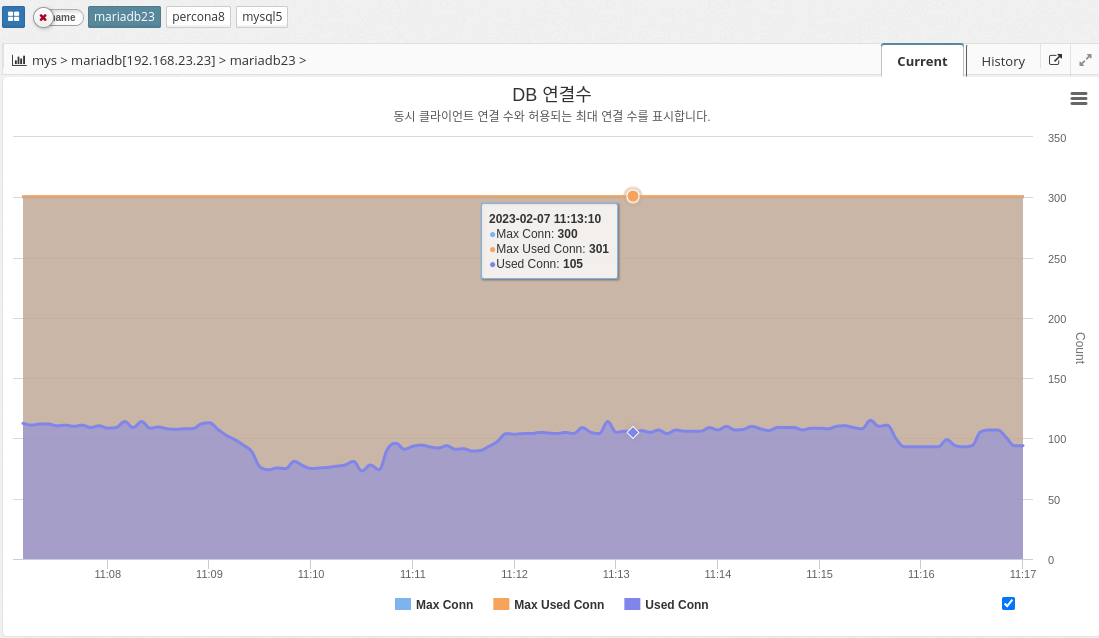
MAX_CONNECTIONS: The maximum number of concurrent connections to the MySQL server allowed. When this limit is reached, all new incoming connections are rejected until some of the existing connections are closed. This value can be set in the my.cnf file, or by using the "SET GLOBAL max_connections" command: +. In practice, Max Connections + 1 client connections are allowed. Additional connections are reserved for use by accounts with SUPER privileges, such as root.
MAX_USED_CONNECTIONS: A variable that indicates the maximum number of connections used since the MySQL server was started.
THREADS_CONNECTED: A variable that indicates the current number of connections to the MySQL server. If the number of connections is equal to the maximum number of connections, new connections are denied until some of the existing connections are closed.
To summarize, MAX_CONNECTIONS sets the limit on the number of concurrent connections that can be made to the MySQL server, MAX_USED_CONNECTIONS indicates the maximum number of connections used so far, and THREADS_CONNECTED indicates the current number of connections to the server.
QPS
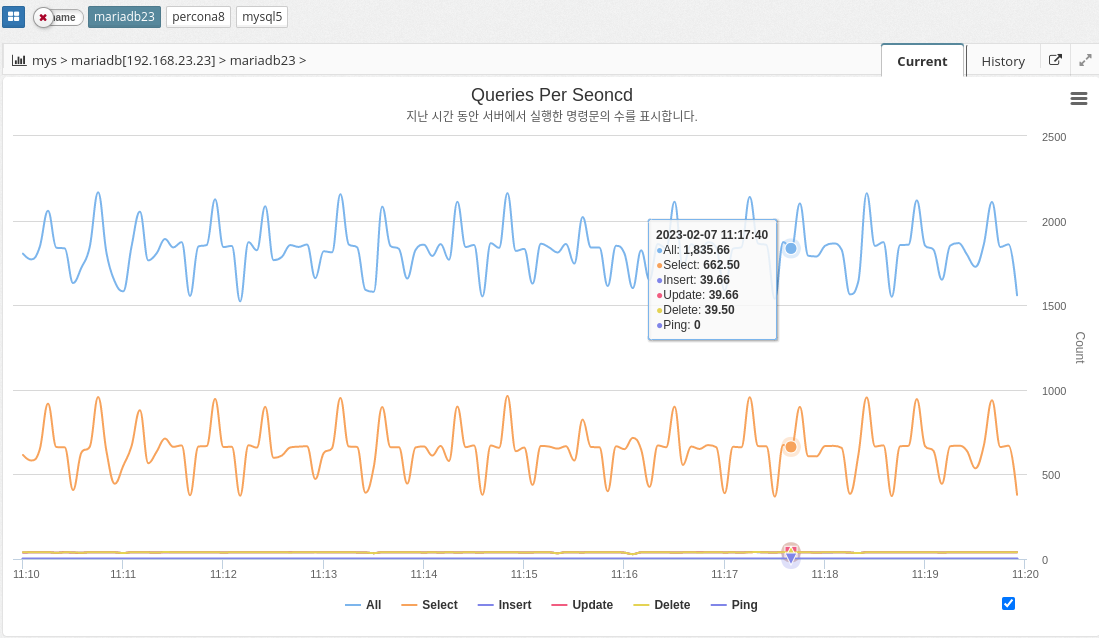
Queries per second (QPS) is a measure of the number of database queries running on the MySQL server in a given amount of time (typically one second). It is a useful metric for monitoring the performance and capacity of a MySQL database because it provides a way to track the workload and demand on the database server.
A high QPS indicates a high level of traffic to the database, which can affect the server’s performance and ability to handle workloads. On the other hand, a low QPS can indicate that the database is underutilized or that the application is not generating enough traffic.
The parameter information used is shown below.
-
QUERIES
-
COM_SELECT
-
COM_INSERT
-
COM_UPDATE
-
COM_DELETE
-
COM_PING
DML ratios
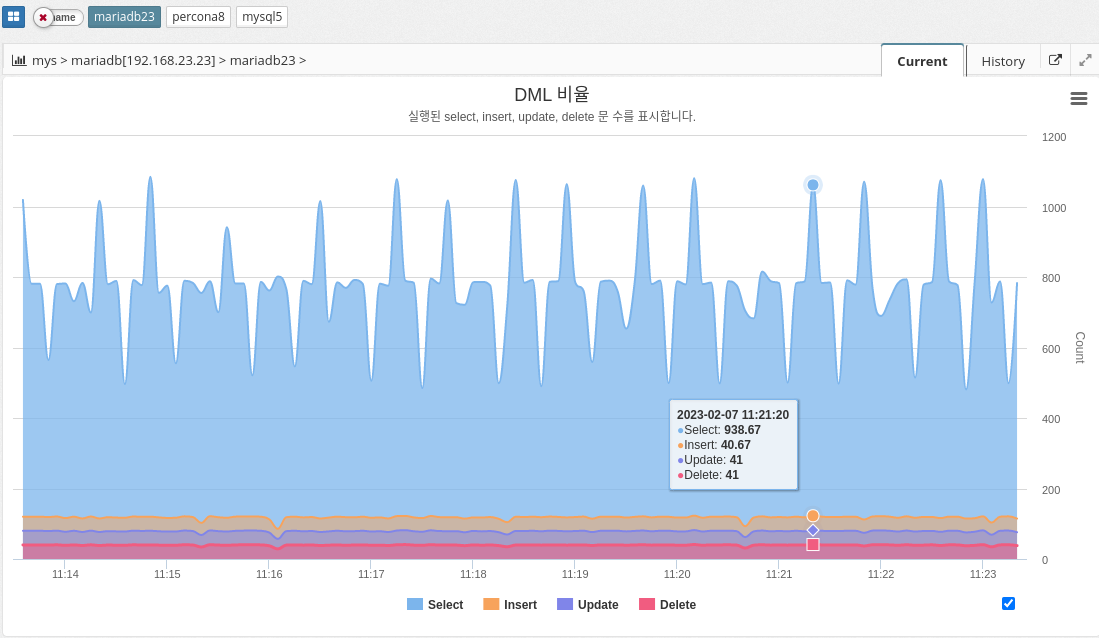
The DML ratio, or data manipulation language ratio, indicates the ratio of data manipulation language (DML) statements to the total number of statements executed in a MySQL database. DML statements include INSERT, UPDATE, and DELETE statements, which are used to modify data stored in the database. The DML ratio is an important metric to monitor in a database because it provides a way to understand the types of statements being executed and the balance between reading and writing data. A high DML ratio can indicate that the database is being heavily modified, which can affect the performance and responsiveness of the database.
The DML ratio is an important metric to monitor in a database because it provides a way to understand the types of statements being executed and the balance between reading and writing data. A high DML ratio can indicate that the database is heavily modified, which can affect the performance and responsiveness of the database.
The parameter information used is shown below.
-
COM_SELECT
-
COM_INSERT
-
COM_UPDATE
-
COM_DELETE
Number of threads running
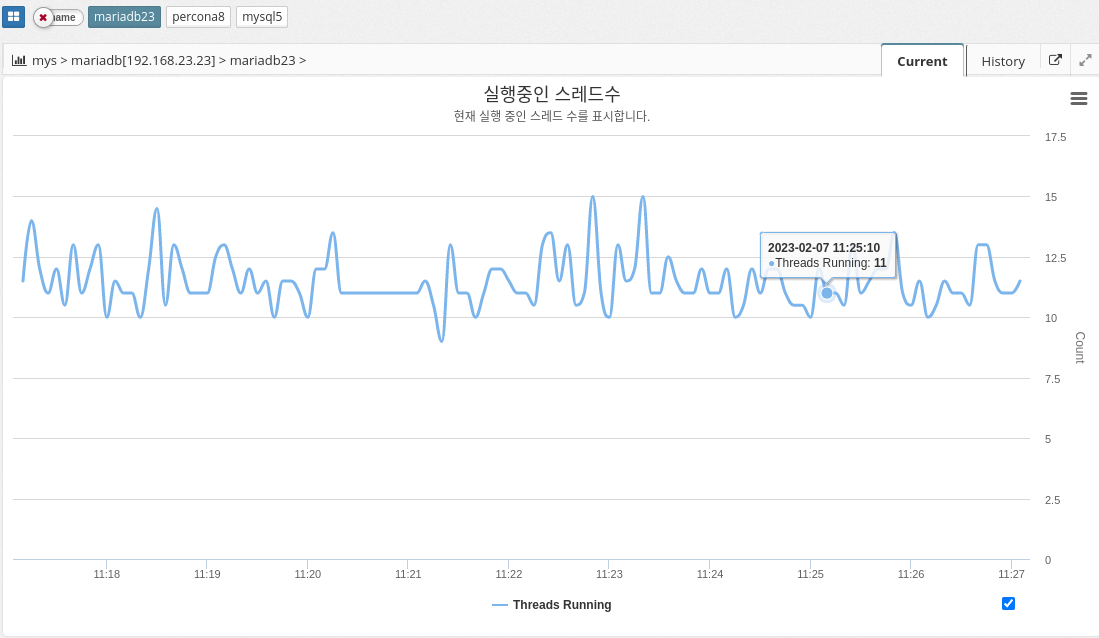
The number of running threads in MySQL indicates the number of active threads, or connections, that are currently executing queries on the database server. Each connection to the database server creates a new thread, and each thread is responsible for executing one or more queries. The Running Thread Count provides a way to monitor the number of concurrent connections to the database and the overall workload on the server.
A high Running Thread Count can indicate that the database is under heavy workload, which can lead to performance issues and slow query response times. A low Running Thread Count can indicate that the database is not being fully utilized or that the application is not generating enough traffic.
It’s important to monitor the Running Thread Count over time and track any changes or trends. This is because it provides a way to understand the overall demand and workload on the database. If the Running Thread Count is consistently high, it might indicate that the database needs to be optimized or scaled to handle increased workload.
The parameter information used is shown below.
-
threads_running
Session Analytics
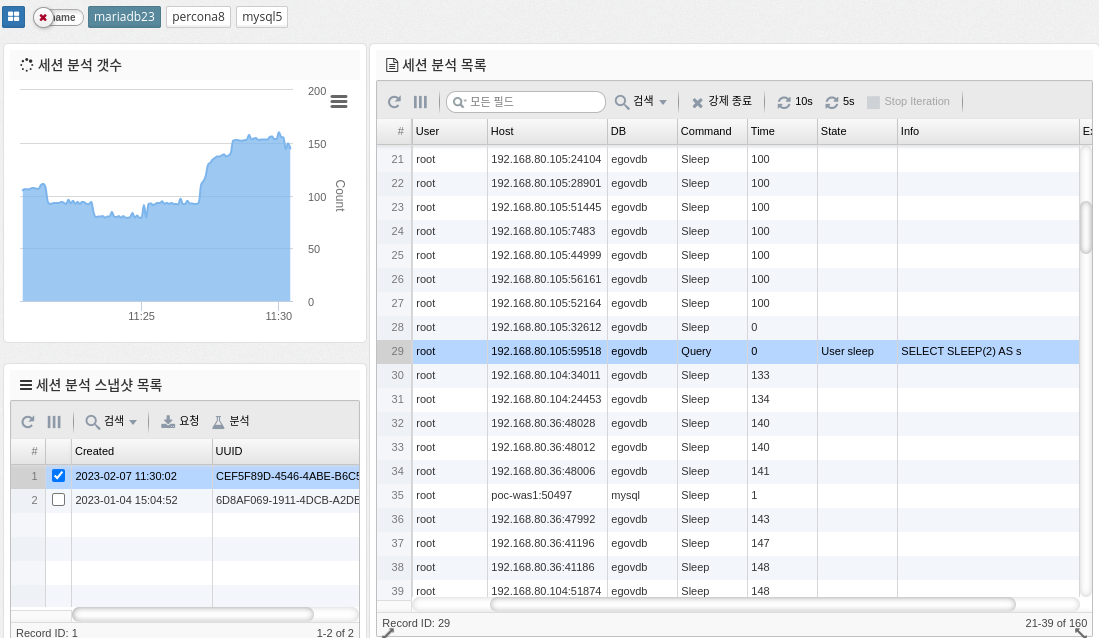
Session analysis in MySQL refers to the process of monitoring and analyzing the behavior of individual user sessions within a MySQL database. This includes analyzing the queries executed in each session, the resources used, and the overall performance of the session. This information can help you identify performance bottlenecks and optimize database performance.
-
Force Terminate: Force terminate the selected session.
| Terminate requires SUPER privileges to work. |
-
10s, 5s : Run requests periodically for the corresponding number of seconds
The parameter information used is shown below.
-
PROCESSLIST_COUNT :