Documents

search result
Home Login Blog

OPENMARU Cloud APM Docs

    • 1.Quick Start
    • 2.User Guide
      • 2.1.1 Getting Started
      • 2.1.2 OPENMARU APM Login/Logout
      • 2.1.4 OPENMARU APM Dashboard screen configuration
      • 2.1.3 OPENMARU APM Screen Configuration and Common Features
      • 2.2.1 WAS instance-specific server information
      • 2.2.2 WAS instance-specific applications
      • 2.2.3 Statistics by WAS Instance
      • 2.2.4 JVMs per WAS instance
      • 2.2.5 Data Sources per WAS Instance
      • 2.2.6 WAS instance-specific thread dump analysis
      • 2.2.7 WAS instance-specific memory object analysis
      • 2.2.8 Analyze open files per WAS instance
      • 2.2.9 Analyze network status by WAS instance
      • 2.2.10 Workgroups - Applications
      • 2.2.11 Workgroup - Statistics
      • 2.2.12 WAS All
      • 2.3.1 Web server dashboard
      • 2.3.2 Web server monitoring
      • 2.4.1 Monitoring DBMS
      • 2.4.2 DBMS dashboard
      • 2.4.3 DBMS Information
      • 2.4.5 DBMS connection count information
      • 2.4.6 DBMS Inno DB
      • 2.4.7 DBMS cache
      • 2.4.8 DBMS Tables
      • 2.4.9 DBMS Query Information
      • 2.4.10 DBMS Reports
      • 2.5.1 System - Dashboard
      • 2.5.1 System - Server information
      • 2.5.1 System - Docker Info
      • 2.5.1 System - Resources
      • 2.5.1 System - Disks
      • 2.5.1 System - Network
      • 2.5.1 System - Network Health Analysis
      • 2.5.1 System - Process Status Analysis
      • 2.6.1 SLA Monitoring
      • 2.7.1 Alert Policy
      • 2.8.1 How to use reports
      • 2.9.1 Configuration
      • 2.9.2 License Management
      • 2.9.3 System Status Information
      • 2.9.4 System Settings
      • 2.10.1 How to Respond to Server Failure with APM
      • Need help?
    • 3.Agent Installation Guide
      • 3.1 Install OPENMARU Cloud APM System Agent
      • 3.2 Installing the OPENMARU Cloud APM WAS Agent
      • 3.3 How to set up the agent for each type of WAS
      • 3.4 Trouble Shooting
    • 4.Container Agent Installation Guide
      • 4.1 Supported Environments
      • 4.2 Build OPENMARU Cloud APM Agent OpenShift Image
      • 4.3 Environment variables available in Pod
      • 4.4 Troubleshooting
    • 5.Event setup guide
      • 5.1 Get APM event notifications with Slack
      • 5.2 How to set up mail sending
      • 5.3 How to set up SMS sending
      • 5.4 Synology Chat Event Integration
    • 6.OPENMARU APM Release Notes
      • 5.1.0-8.8
      • 5.1.0-8.7
      • 5.1.0-8.6
      • 5.1.0-8.5
      • 5.1.0-8.4
      • 5.1.0-8.3
      • 5.1.0-8.2
      • 5.1.0-8.1
      • 5.1.0-8.0
      • 5.1.0-7.9
      • 5.1.0-7.8
      • 5.1.0-7.7
      • 5.1.0-7.6
      • 5.1.0-7.5
      • 5.1.0-7.4
      • 5.1.0-7.3
      • 5.1.0-7.2
[object Object]
OPENMARU Cloud APM Docs master
  • OPENMARU Cloud APM Docs
    • master
  • Docs
  • 2.User Guide
  • 2.9.3 System Status Information
share SNS

2.9.3 System Status Information

image 2022 12 28 17 09 25 899
image 2022 12 28 17 12 05 563

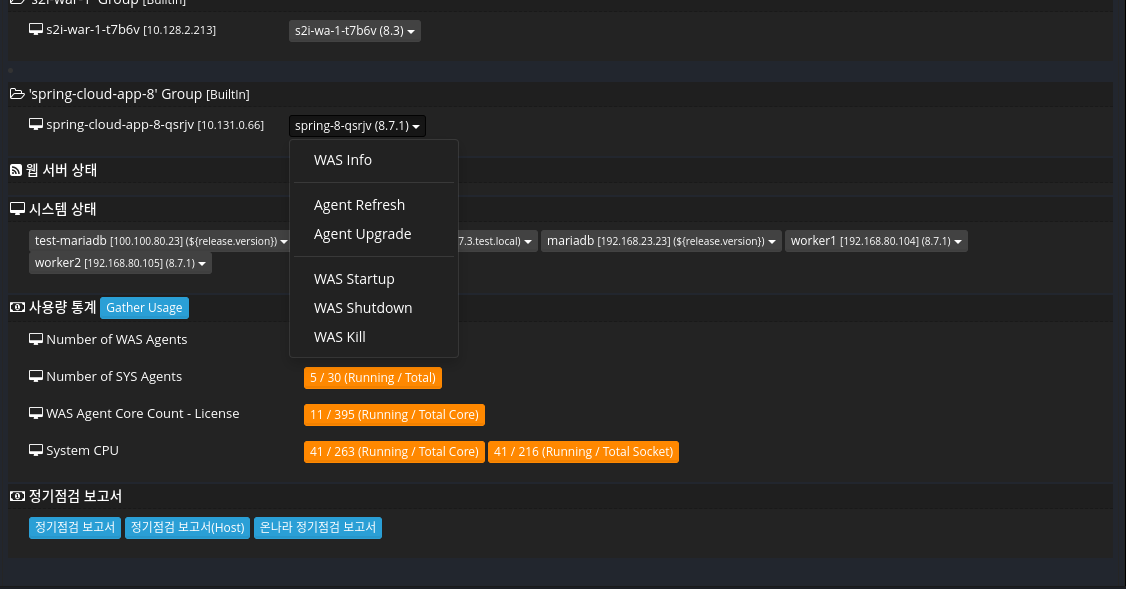
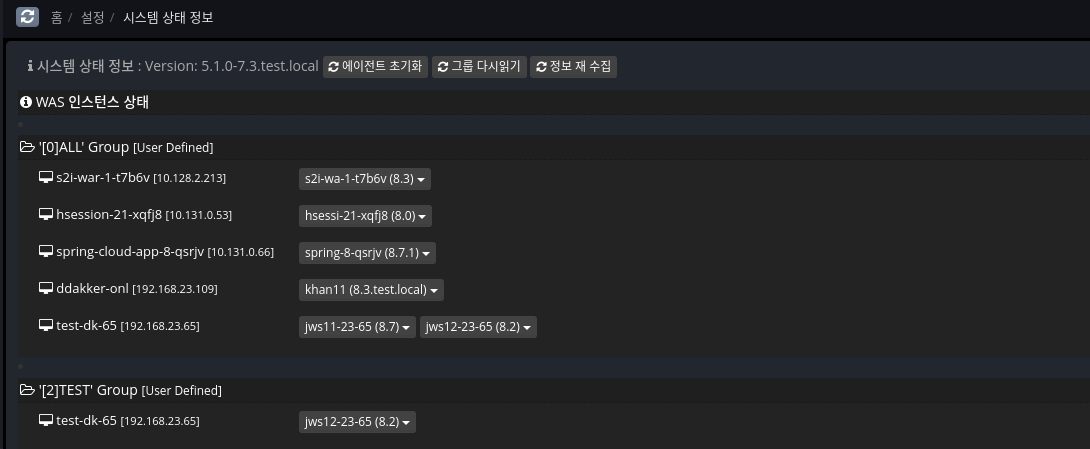
View the overall instance status of the system.

Features.

  • Usage statistics

  • Regular maintenance report download

  • Agent controls

2.9.2 License Management 2.9.4 System Settings
오픈나루(주) | 서울시 성동구 뚝섬로1길 31 906~907호(성수동1가, 서울숲 M타워) | 대표전화: 02-469-5426 | 팩스: 02-469-7247 | 고객지원: support@opennaru.coom, 070-4044-5426
대표이사: 전준식 | 사업자등록번호: 206-86-83165 | 통신판매업 신고번호: 제2020-서울성동-02880호 | 개인정보관리 책임: privacy@opennaru.com
Copyright © 2020 Opennaru, Inc. All Rights Reserved.