2.4.6 DBMS Monitoring: Inno DB
Buffer pool allocation rate
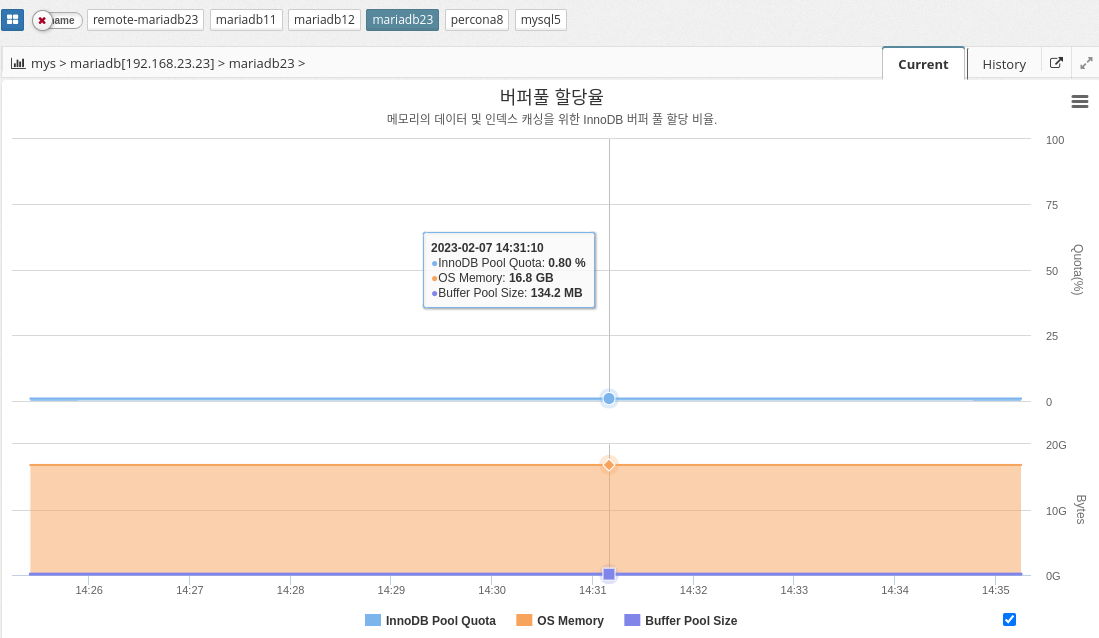
MySQL’s buffer pool allocation percentage indicates the amount of memory allocated to the buffer pool in relation to the total memory available on the system. The buffer pool is the area of memory in MySQL where pages of data are stored, allowing for faster access to data.
The buffer pool allocation percentage is set by the variable "innodb_buffer_pool_size". The default value is 128 MB, but you can change it to a higher value to allocate more memory to the buffer pool and improve performance. The buffer pool allocation percentage is calculated as follows
innodb_buffer_pool_size / total system memory
A higher buffer pool allocation percentage means that more memory is dedicated to the buffer pool and less memory is available for other tasks. A buffer pool that is too large can lead to swapping and poor performance. It is important to find the optimal value for the buffer pool allocation percentage by monitoring the performance of your system and adjusting the value accordingly.
In summary, MySQL’s buffer pool allocation ratio determines how much memory is allocated to the buffer pool to store data pages and improve performance. The optimal value for this ratio can vary depending on the database size and available system resources.
The parameter information used is shown below.
-
Calculation
INNODB_BUFFER_POOL_SIZE / OS_MEMORY * 100
| Enabled if the agent is a host with a DBMS installed. |
Buffer pool hit rate
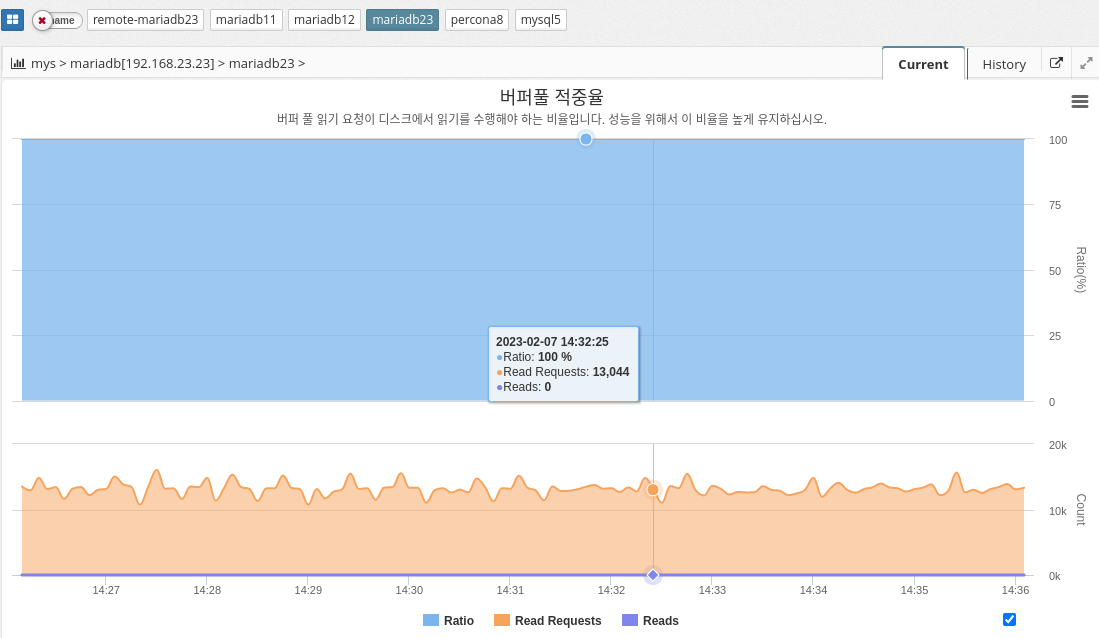
MySQL’s buffer pool hit ratio indicates the percentage of database page requests that are fulfilled in buffer pool memory, as opposed to being retrieved from disk. A buffer pool is an area of memory where frequently accessed data pages are stored for quick retrieval without accessing disk.
A high buffer pool hit ratio indicates that the buffer pool is effectively caching frequently accessed data, which improves performance. On the other hand, a low buffer pool hit ratio indicates that the buffer pool is not large enough to store all frequently accessed data pages, resulting in frequent disk accesses and poor performance.
To optimize the buffer pool hit ratio, administrators can resize the buffer pool to match the amount of available memory and workload requirements. You can also use the innodb_buffer_pool_instances configuration parameter to divide the buffer pool into multiple smaller pools to improve concurrency and avoid performance bottlenecks.
Keep this ratio high for good performance.
The parameter information used is shown below.
-
Calculation
INNODB_BUFFER_POOL_READ_REQUESTS / (INNODB_BUFFER_POOL_READ_REQUESTS + INNODB_BUFFER_POOL_READS) * 100
Buffer pool page
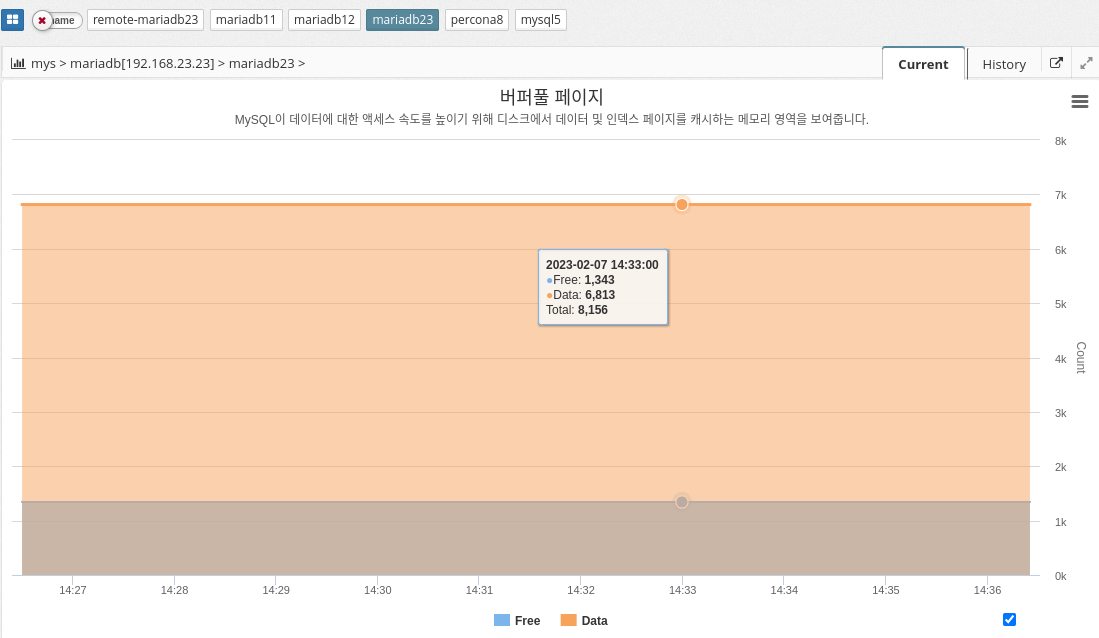
MySQL’s buffer pool is an area of memory used to cache frequently used pages of data to improve performance. When a query is executed, MySQL first checks the buffer pool to see if the required data pages are already in memory. If so, the query can execute much faster because the data pages don’t need to be read from disk. If the required data page is not in memory, it is read from disk and added to the buffer pool.
The buffer pool is divided into multiple buffer pool pages, each of which can store a single data page. You can configure the size of the buffer pool and the number of buffer pool pages to balance performance and memory usage. Larger buffer pools generally provide better performance but consume more memory.
In summary, MySQL’s buffer pool is an important component that helps improve performance by caching frequently used data pages in memory. By configuring the size and number of buffer pool pages, administrators can control the amount of memory used for caching and optimize performance for their specific needs.
IO rate
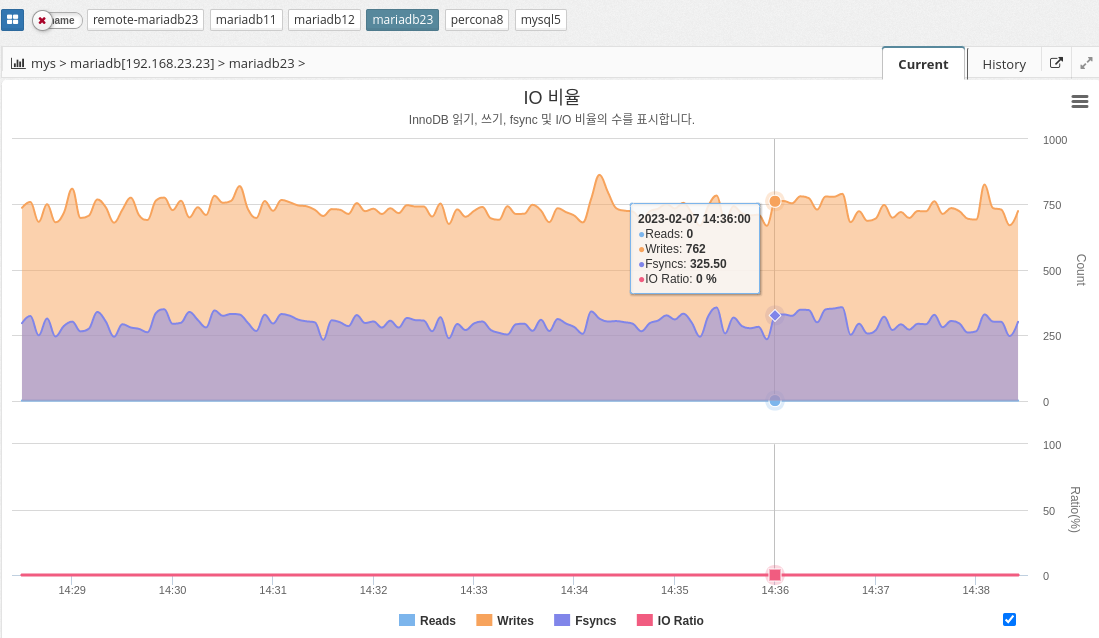
In MySQL, the IO ratio can be measured using various performance metrics such as InnoDB buffer pool hit ratio, query response time, and disk I/O latency. The exact calculation of the IO ratio can vary depending on the specific metric used, but it generally involves measuring the number of disk reads and writes against the number of database operations performed.
In conclusion, it is essential to monitor the IO ratio in MySQL to maintain efficient use of disk resources and optimal database performance.
The parameter information used is shown below.
-
INNODB_DATA_FSYNCS : Number of fsync() operations so far. How often fsync() is called.
-
INNODB_DATA_READS: Total number of data reads.
-
INNODB_DATA_WRITES: total number of data writes
-
Calculate
INNODB_DATA_READS/(INNODB_DATA_READS+INNODB_DATA_WRITES+INNODB_DATA_FSYNCS) * 100
Latency
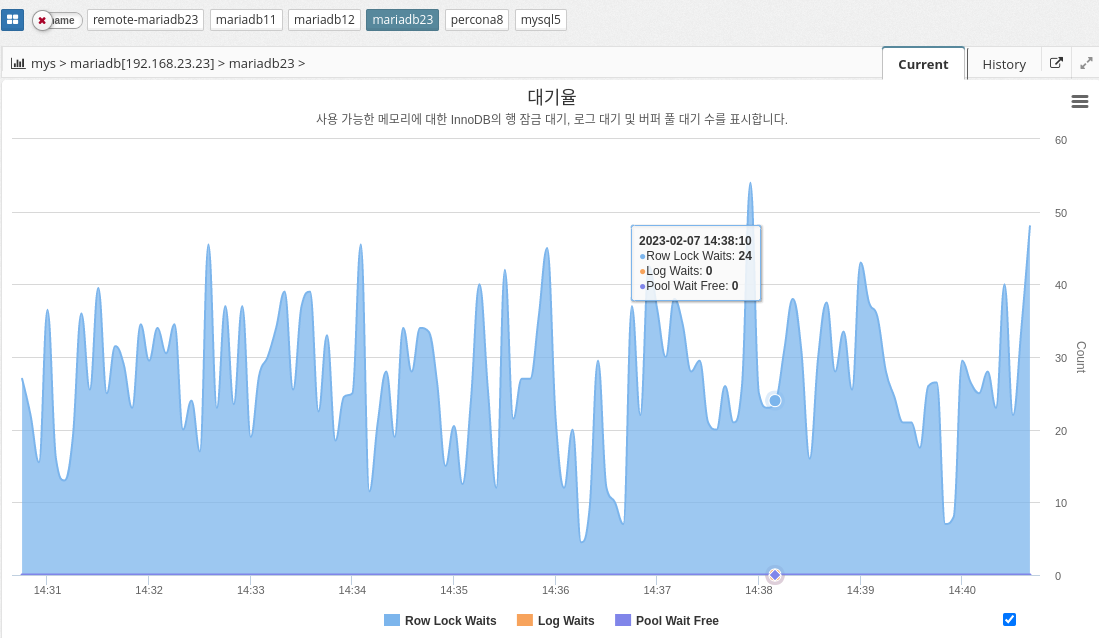
InnoDB wait represents the amount of time a thread in the InnoDB storage engine must wait for a resource to become available before continuing its work. This wait can be caused by a variety of factors, such as lock contention, disk I/O, or memory allocation.
InnoDB wait can affect the overall performance of the database because it delays query and transaction processing. It is important to monitor and identify the root cause of InnoDB wait and take appropriate action to reduce or eliminate it.
There are several common InnoDB waits that database administrators may encounter, including the following
The parameter information used is shown below.
-
INNODB_ROW_LOCK_WAITS: The number of waits to obtain an InnoDB row lock.
-
INNODB_BUFFER_POOL_WAIT_FREE: The number of times a thread should wait for a free page in the buffer pool.
-
INNODB_LOG_WAITS: The number of times the log buffer was too small to accommodate incoming write requests and had to wait until space was freed up.