3.2 Installing the OPENMARU Cloud APM WAS agent
Author |
Version |
Date |
Usage |
v1.0 |
2021-09-03 |
Download the WAS agent
Log in to the console of the OPENMARU APM server and download the files for installation.
Select the Settings > Resources menu and you will see a page where you can download the user manual WAS Agent and System Agent as shown below.
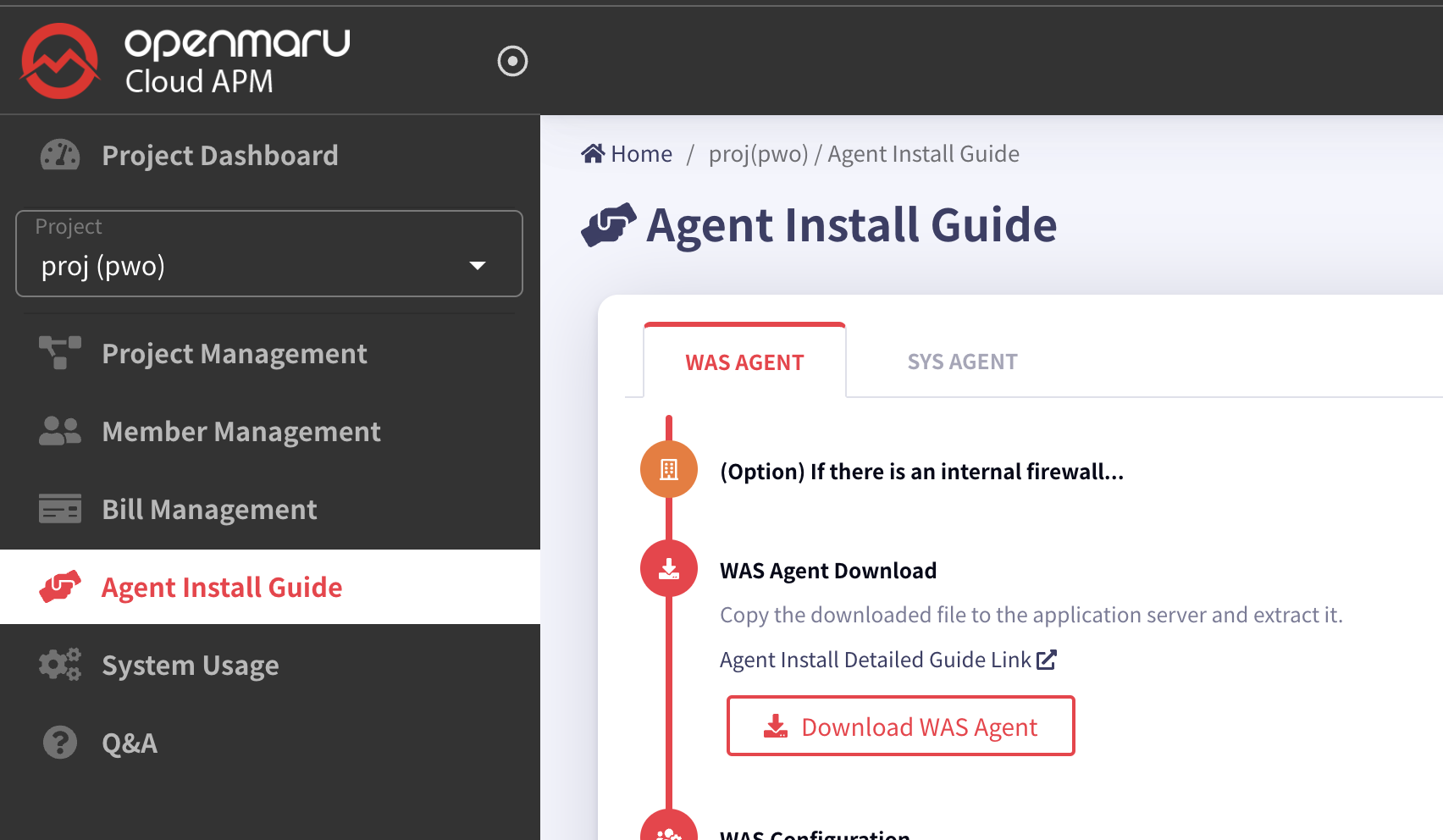
Download the file to install the system agent.
If you are using a Linux operating system, you can download it directly using the wget command as shown below.
Java 1.8 or later is recommended.
-
Download the WAS agent.
$ wget https://cloud.openmaru.io/api/v1/projects/[projectID]/download/was-agent.zip
Install the WAS agent
-
unzip agent installation file.
$ unzip khan-agent-5.1.0.zip
-
Create a khan-agent.jar symbolic link file.
Create a symbolic link file as shown below to facilitate khan-agent version upgrade.
Enable the khan-agent.jar file in the agent settings of WAS, and when you upgrade the khan-agent version, you can remove the symbolic link and create a new one with the new version of the file.
$ ln -s khan-agent-5.1.0.jar khan-agent.jar
Set up the WAS agent
To set the WAS server instance name
Setting in the khan-agent.conf file.
# WAS Instance's ID
# Can use RANDOM string or IP ADDRESS
# ex: instanceid-${RANDOM:4} ==> instanceid-qfPb
# ex: instanceid-${RANDOM:4}-s ==> instanceid-qfPb-s
# ex: instanceid-${IPADDR:3} ==> instanceid-23-10 (ip=192.168.23.10)
# ex: instanceid-${HOSTNAME:-:2} ==> instanceid-apm (hostname=test-apm)
# ex: instanceid-${HOSTNAME:-:2}-${IPADDR:3}-${RANDOM:4}-s ==> instanceid-apm-23.10-afcg-s (hostname=test-apm, ip=192.168.23.10)-
${RANDOM:4} : Generate 4 random uppercase/lowercase letters of the alphabet
-
${IPADDR:3} : Add the 3rd digit of the IP address
-
${IPADDR:-1}: Adds the first digit of the IP address from the back.
-
${hostname:-:2} Add the second digit of the HOSTNAME, separated by -.
khan-agent.conf configuration file
The parts of the configuration file below that need to be changed are marked with a fluorescent color.
###################  OPENMARU APM Agent Configuration File  ###################

# Group name
# ex: grp-${HOSTNAME:-:1}-${HOSTNAME:-:2}  ==> grp-jbossweb53-20  (hostname=jbossweb53-20-8tp2j)

application.name=openmaru

# KHAN [monitoring] Server's IP Address and Port
khan.host=Cloud APM default
khan.port=443
khan.tls=true
#khan.tls=false

# specify this machine's ip address, only valid ip address of this machine can be used.
#khan.agent.ip=

user.key=NIL

# WAS Instance's ID
# Can use RANDOM string or IP ADDRESS
# ex: instanceid-${RANDOM:4}  ==> instanceid-qfPb
# ex: instanceid-${RANDOM:4}-s  ==> instanceid-qfPb-s
# ex: instanceid-${IPADDR:3}  ==> instanceid-23-10   (ip=192.168.23.10)
# ex: instanceid-${HOSTNAME:-:2}  ==> instanceid-apm  (hostname=test-apm)
# ex: instanceid-${HOSTNAME:-:2}-${IPADDR:3}-${RANDOM:4}-s  ==> instanceid-apm-23.10-afcg-s  (hostname=test-apm, ip=192.168.23.10)

instance.id=khan11
agent.type=WAS

# agent's compression algorithm : snappy(default), lzw
#agent.compress.type=lzw

# APDEX satisfied response time in seconds(duration <= apdex = SATISFIED, duration > apdex*4 = APDEXTHRESHOLD, else = TOLERATING)
apdex.threshold=3.0

# enable transaction trace
transaction.trace.enabled=true
# transaction trace threshold in ms
transaction.trace.threshold=500
transaction.trace.threshold.under.detail.enabled=false

# Maximum number of lines to save trace
transaction.trace.max.line=2000

# enable sql capture
sql.capture.enabled=true

transaction.trace.sql.parameterize=false
# sampling intervals
transaction.trace.sampling.interval=1

# SQL query's stacktrace threshold in ms
transaction.trace.sql.stacktrace.threshold=30000

# SQL query max size (default unlimit)
#transaction.trace.sql.max.size=-1

# SQL query parameter max size (default 40)
transaction.trace.sql.parameter.max.size=40

# enable request header trace : default = false
#transaction.trace.header.enabled=true
# request header trace keys
transaction.trace.header.keys=

# enable request cookie trace : default = true
#transaction.trace.cookie.enabled=false
# request cookie trace keys : default JSESSIONID
transaction.trace.cookie.keys=JSESSIONID

# enable session trace : default = false
#transaction.trace.session.enabled=false
# session trace keys(class maximum depth : 2)
# ex: loginId, user:userId
transaction.trace.session.keys=

# add parameter to url (key1:maxLen,key2,maxLen)
# ex) p1:10,p2:10
#transaction.trace.parameter.keys=


# database fetch count warning
#database.fetch.warnings=10000,20000,30000

# database connection leak warning
database.conn_leak.warning=false

# enable or disable whole database pool statistics monitoring
# default : true
# can override with environment : KHAN_DB_POOL_STAT_ENABLED
#database.pool.stat.enabled=false

# include patterns : comma separated datasource name patterns list to include
# can override with environment : KHAN_DB_POOL_INCLUDE_PATTERNS
#database.pool.stat.include.patterns=

# exclude patterns : comma separated datasource name patterns list to exclude
# can override with environment : KHAN_DB_POOL_EXCLUDE_PATTERNS
#database.pool.stat.exclude.patterns=

include.packages=

# exclude url patterns(Regular Expression), can use multiple regexp with comma(,)
# ex) transaction.exclude.url.patterns=/test/test.*,/abc/test.*
#transaction.exclude.url.patterns=
transaction.exclude.url.patterns=\\*

# exclude url suffix
transaction.exclude.url.suffix=.gif,.swf,.css,.hwp,.xls,.xlsx,.eot,.pptx,.ppt,.asf,.pdf,.txt,.flv,.mp3,.mp4,.doc,.html,.wmv,.jpg,.zip,.wav,.png,.ttf,.mov,.ico,.js,.woff,.xml,.htc,.NewProxyConnection,.DelegatingConnection,.SqlSessionTemplate,.CUBRIDConnection,.PoolableConnection,.WrappedConnection,/bea_wls_deployment_internal/DeploymentService,.GIF,.SWF,.CSS,.HWP,.XLS,.XLSX,.EOT,.PPTX,.PPT,.ASF,.PDF,.TXT,.FLV,.MP3,.MP4,.DOC,.HTML,.WMV,.JPG,.ZIP,.WAV,.PNG,.TTF,.MOV,.ICO,.JS,.WOFF,.XML,.HTC
transaction.exclude.url.suffix.exclude=true

# exclude browser user-agent : ^openmaru-health-check$(default)
transaction.exclude.user.agent.patterns=^openmaru-health-check$

# comma seperated url patterns that consider the status code to be 500
# transaction.errorpage.url.patterns=/session/force500.*,/test/test500.*

# Display when an exception is included
transaction.with.exception.view.enabled=true

# Display when an HTTP API Error is included : default error status codes - 400 more than
transaction.with.external.http.error.view.enabled=true
transaction.with.external.http.error.codes=

# Request Traffic Controller(RTC) WALL
# enabled = false (default)
#traffic.control.enabled=true

# pattern.1=/url_startswith.*, maximum allowed concurrent requests
#traffic.control.pattern.1=/test/slow.*, 100
#traffic.control.pattern.2=/test/test.*, 100
#traffic.control.pattern.3=/test/TestServlet.*, 100

# -----------------------------
# User Behavior Tracker Options
# -----------------------------
ubt.check.enabled=false
# User Behavior check type : ip, cookie
ubt.check.type=ip
# UBT check alert count
ubt.check.user.count=100
# UBT check interval(Seconds)
ubt.check.time.interval=1
# UBT check alert prevent duplication(Seconds)
ubt.check.alert.dup.prevent=30

# 2 : use KHANUSER Cookie - Default
# 1 : use JSESSION_ID Cookie
# 0 : not use cookie - use client ip
user.tracking.mode=2

# 99 : last in the array
# N : index number in array (Last value without N)
# 0 : first in array
# -1 : original - Default
#user.tracking.client.ip.selection=-1

# user think time : default 5 minutes, max 15 minutes
# Can override with KHAN_USER_THINK_TIME environment
#user.thinktime.minutes=5

# Merge by removing duplicates
user.tracking.v2.enabled=false

# Tracking by login ID, default false
user.tracking.v2.login.enabled=false
# ex) session|loginId
# ex) session|user:loginId - desction : user(session key, LoginUser class), loginId(POJO, Member variable), class maximum depth : 2
# ex)  header|loginId
# ex)  cookie|loginId
user.tracking.v2.login.key=session.loginId

# To Disable Servlet Filter interceptor set false, default true
#enable.filter.interceptor=false

# To Disable ibatis interceptor set false, default true
#enable.ibatis.interceptor=false

# To Disable mybatis interceptor set false, default true
#enable.mybatis.interceptor=false

# To Disable HTTP interceptor set false, default true
#enable.http.interceptor=false

# To Disable SpringBatch interceptor set false, default true
#enable.springbatch.interceptor=false

# To enable logging interceptor set true, default false
enable.logging.interceptor=false

# comma separated logging levels to capture logging levels
# logging levels : TRACE,DEBUG,INFO,WARN,ERROR,FATAL
trace.logging.levels=WARN,ERROR,FATAL

# Push transaction details immediately(KAPM-1801), default : false
#push.transaction.no.delay=true

# Stop services after execute standlone application
# Only for standalone java application. default : false
#stop.services.after.execute=true

# count first request as active user
activeUser.countFirstRequest=false

user.charset.encoding=UTF-8
user.interceptor.file=user-interceptor.conf

# log directory
#log.dir=/svc/test/khan-agent/log

# log file name
log.file=khan-agent-${INSTANCEID}.log

# log level
log.level=INFO

# log files backup index( default : maintain 3 files)
log.backup.index=3

# log rotation file size : default 10M
log.rotate.size=10240000

# khanSessionManager
khan.session.manager.enabled=false

# enable session count( default: true)
active.session.count.enabled=true

# enable audit log file(default: false)
#audit.log.enabled=true
# User interceptor's user id key name(default: USER_ID)
#audit.log.userIdKey=USER_ID
# audit log directory(default: agent log directory)
#audit.log.dir=
# audit log file name(default: audit-{date: yyyy-MM-dd}.log )
#audit.log.filename=audit-{date: yyyy-MM-dd}.log
# audit log file rotating policy
#audit.log.policies=daily: 00:00
# audit log backup file counts
#audit.log.backups=3
Refer to the following table for a description of each item in the khan-agent.conf configuration file.
khan-agent.conf Configuration Details
(Use parentheses when using JVM environment variables (-D) and system environment variables (export or set))
Configuration priority : JVM OPTS > OS ENV > khan-agent.conf
All options in the configuration file can be used as environment variables by capitalizing them starting with the "OMAPM_" prefix and changing the . (dot) to _ (underscore).
| Setting item (environment variable) | Description | Default value |
|---|---|---|
omapm_sys_agent_enable |
Whether the agent is enabled or not (Available when using OPENMARU BASE WAS Container image) |
|
application.name |
Sets the name of the application group displayed in the OPENMARU APM console. Instances set to the same name are grouped and displayed. |
N/A |
khan.host |
Enter the IP of the OpenMARU APM server. +} or http:// or ws:// if entering a domain (https:// or wss:// for TLS) |
khan.port |
khan.port |
OPENMARU APM server. |
|
khan.tls |
TLS enabled or not |
false |
khan.agent.ip |
If not set, uses the machine’s default IP address as the default. Sometimes 127.0.0.1 is selected if no IP address is registered in the /etc/hosts file. In this case, set it by entering the machine IP address in khan.agent.ip. |
user.key |
user.key |
Not currently used |
|
instance.id (OMAPM_INSTANCE_ID) |
Name of the instance to be displayed in OPENMARU APM, with each instance using a unique name. |
agent.type |
agent.type |
Agent type, WAS |
WAS |
apdex.threshold |
User-satisfied response time used when calculating the user satisfaction index (default: 3.0, unit: seconds) |
3.0 |
transaction.trace.enabled |
Enable transaction trace. |
true |
transaction.trace.threshold |
Sends transactions older than the specified time to the server (unit: ms) |
500 |
sql.capture.enabled |
Set whether to collect SQL information |
true |
transaction.trace.sql.parameterize |
Option to strip all ' ''s in SQL statements |
false |
transaction.trace.sampling.interval |
Settings for sampling and sending transaction information. If set to 10, only 1 out of 10 times the same URL is sent. |
1 |
transaction.trace.sql.stacktrace.threshold |
Generates a stack trace when a SQL query is running for more than the specified time (ms). |
30000 |
transaction.trace.sql.max.size |
Limit the length of the SQL query to collect. + (OMAPM_TRANSACTION_TRACE_SQL_MAX_SIZE) Since 5.1.0-8.3 |
-1: No limit |
transaction.trace.sql.parameter.max.size |
Limit the length of SQL query parameters to be collected. |
40 |
transaction.trace.async.thread.enabled |
Whether to monitor asynchronous threads.
Runnable, ForkJoinTask, CompletableFuture |
false |
database.pool.stat.enable |
Collect connection pool information |
true |
database.fetch.warnings |
Displays warnings when fetching a specified number of comma-separated SQL ResultSets. If set to 10000,20000,30000,40000, a warning message is displayed when the number of ResultSet Fetches is 10,000,20,30,40,000. |
10000,20000,30000 |
database.conn_leak.warning |
Set whether to display a warning message when a database connection pool leak occurs. |
true |
transaction.exclude.url.patterns |
Specifies URL patterns to exclude from collecting transaction information. You can specify multiple patterns separated by commas. Example) /test/test.,/abc/test. |
|
transaction.exclude.url.suffix |
Specifies URL extensions to exclude from transaction information collection. URLs for static content such as JPGs and GIFs are set to be excluded. |
|
transaction.exclude.url.suffix.exclude |
Specifies whether to use the above setting (transaction.exclude.url.suffix). |
true |
transaction.exclude.user.agent.patterns |
Browsers to exclude from collection |
^openmaru-health-check$ |
traffic.control.enabled |
Raises an exception if the number of concurrent processing exceeds for the set Request URL pattern. |
false |
traffic.control.pattern.INDEX |
traffic.control.pattern.1=/test/slow., 100 traffic.control.pattern.2=/test/test., 100 |
true |
ubt.check.enabled |
Raise an alert notification if a request from a client (IP, COOKIE) occurs a certain number of times at a certain time. |
false |
ubt.check.type |
Same client judgment distinction (IP, COOKIE) |
ip |
ubt.check.user.count |
Count of checks |
100 |
ubt.check.time.interval |
Check time interval (seconds) |
1 |
ubt.check.alert.dup.prevent |
Time to prevent duplicate alert notifications (seconds) |
30 |
user.charset.encoding |
Set the user character set encoding. |
UTF-8 |
user.interceptor.file |
Specifies the user-interceptor configuration file so that you can measure the execution time of the desired method. |
user-interceptor.conf |
log.dir |
Specifies the directory where agent log files will be created. |
The |
log.file |
Specifies the name of the agent log file. |
log.level |
log.level |
Sets the agent log level. |
INFO |
log.backup.index |
Specifies the number of agent log files to keep. |
10 |
log.rotate.size |
Specifies the size of the log file to be rotated. (Default: 100MB) |
102400000 |
khan.session.manager.enabled |
Enable if using OPENMARU Cluster. |
false |
active.session.count.enabled |
Whether to collect WAS session counts |
true |
enable.logging.interceptor |
Determine whether to collect application logs Collect errors from SLF4J, Log4j, Log4j 2, and Logback set by the application |
false |
trace.logging.levels |
Specify the error levels to collect application logs for Specify TRACE, DEBUG, INFO, WARN, ERROR, and FATAL, separated by commas. |
warn,error,fatal |
transaction.trace.max.line |
Maximum number of lines to collect transaction trace details. |
2000 |
transaction.trace.header.enabled |
Whether to collect Request Header |
false |
transaction.trace.header.keys |
Request Header List of keys to be collected |
JSESSIONID |
transaction.trace.session.enabled |
Whether to collect session |
false |
transaction.trace.session.keys |
List of keys to collect for SESSION + (OMAPM_TRANSACTION_TRACE_SESSION_KEYS) Separated by ,(comma) (POJO objects are separated by the ":" symbol) symbol to separate POJO objects) ex) loginId, user:userId |
|
push.transaction.no.delay |
Send transaction message directly |
Pure Java Shutdown after running cron schedule Java |
stop.services.after.execute |
Use if not terminated after Pure Java execution + (OMAPM_STOP_SERVICES_AFTER_EXECUTE) ex) If the process is not terminated after applying push.transaction.no.delay=true |
Pure Java Exit after Cron Schedule Java execution |
user-interceptor.conf configuration file
OPENMARU APM’s agent internally measures the execution time of the main methods of Java EE and other popular frameworks and displays them in the transaction details.
If you want to measure the execution time of a user-created application, you can do so through the settings in the user-interceptor.conf file.
If you set too many methods in the user-interceptor.conf file, the transaction details data may be very large and cause problems. You should set only the methods you want to measure execution time.
If you want to measure the execution time, you can use the @TraceMethod annotation at the top of the method to measure and display the execution time. The @TraceMethod is only used when using the OPENMARU APM agent, otherwise it is ignored.
user-interceptor configuration file part of the khan-agent.conf file
user.interceptor.file=user-interceptor.conf
The default value for user.interceptor.file is user-interceptor.conf.
The file can be located in the same directory as the khan-agent.jar file.
It’s convenient to keep only the pattern definition files you want to hook into separate.
Define the Rule in the file below. It follows the conventions of the Java properties file.
The # is a comment, which you specify in the form of package/class=method_pattern.
How to set up the user-interceptor.conf file
-
When you want to hook a specific method by specifying a package, class name, etc. You can specify the method names separated by commas (,).
com/opennaru/package/ABCDEFMethodOnly=abc, def
-
Hooking all methods within a specific package/class
com/opennaru/package/AllMethodsInThisClass=
-
Hooking methods that start with a specific name within a specific package/class. You can use a regular expression
com/opennaru/package/regexpMethodsInThisClass=/set.*/, /get.*/
-
To hook all packages/classes/methods under a specific package
com/opennaru/package/allsubclasses/.*=
-
Hooking only method names with a specific (regular expression) name in all packages/classes under a specific package
com/opennaru/allsubpackagesandclasses/.*=/set.*/, /get.*/
-
Subpackage names are separated by '/' or '.' to separate subpackage names. For example:
com.opennaru.allsubpackagesandclasses/.*=/set.*/, /get.*/
-
Regular expressions can also be used in class names
com/opennaru/anyclassesstartwith.*=/set.*/, /get.*/
Example of user-interceptor.conf settings
Below is an example file to measure the execution time by hooking specific methods and classes of the e-government framework.
# All packages/classes/methods under egovframework.let
egovframework.let/.*=

# Methods that start with get, except for methods that start with set and methods that start with getBbs in classes that start with Board under the egovframework/let/cop/bbs/service package
egovframework/let/cop/bbs/service/Board.*=/set.*/, /get(?!Bbs.*).*/

# All methods starting with get/set in all packages/classes under egovframework
egovframework/.*=/set.*/, /get.*/

# package names can be found with '/'
egovframework/let/cop/bbs/service/BoardMaster=/setBb.*/,/setRe.*/

# Package names can be found as '.'
egovframework.let.cop.bbs.service.BoardMaster=/setBb.*/,/setRe.*/
How to set User Interceptor using environment variable
In addition to the interceptor settings in the user-interceptors.conf file, you can set additional user interceptors using the OMAPM_INTERCEPTORS environment variable.
Setting priority: JVM OPTS > OS ENV > user-interceptors.conf
Enter a string separated by semicolons ( ; ).
| Settings (environment variables) | Description | Default |
|---|---|---|
omapm_interceptors |
OMAPM_INTERCEPTORS Measures the execution time of a user-created application’s Class.Method. |
} |
*Real-world application
Example) com/opennaru/test.=set.;com/test.=get.
## Enclose "(double quotes) on both sides of the value
## Otherwise ;(semicolon) has no effect
## Use \(backslash) without "(double quotes)

export OMAPM_INTERCEPTORS="egovframework/let/cop/bbs/service/Board.*=/set.*/, /get(?!Bbs.*).*/;egovframework/.*="
Agent Options in the Startup Script
If you specify the following options when WAS or Java is started, the WAS agent will be started.
export JAVA_OPTS=" $JAVA_OPTS -javaagent:/svc/test/khan-agent/khan-agent.jar "
export JAVA_OPTS=" $JAVA_OPTS -Dkhan.config.file=khan-agent-test11.conf"
export JAVA_OPTS=" $JAVA_OPTS -noverify"
In khan.config.file, specify the name of the file. The file can be located in the same directory as the khan-agent.jar file.
Some WAS types require different locations for agent settings or special options, which are described in detail in the next chapter.