5.3 How to set up SMS sending
Setting up APM events
APM Settings → System Settings → Event tab - SMS + Select Enabled to True. Enabled to True
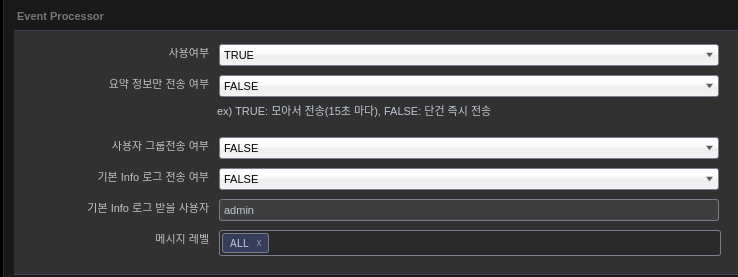
Install khan-event-processor
khan-event-processor-5.1.0-2.6-dist.zip
drwxr-x--- 4 khanapm khan 137 Mar 15 15:57 config
-rwxr-xr-x 1 khanapm khan 671 Jan 4 12:57 kill.sh
drwxr-x--- 2 khanapm khan 44 Mar 15 15:57 lib
drwxr-x--- 2 khanapm khan 21 Mar 15 15:57 logs
-rwxr-xr-x 1 khanapm khan 594 Jan 4 12:57 nohup.sh
-rwxr-xr-x 1 khanapm khan 1057 Jan 4 12:57 start.sh
-rwxr-xr-x 1 khanapm khan 633 Jan 4 12:57 status.sh
-rwxr-xr-x 1 khanapm khan 599 Jan 4 12:57 tail.sh
Configure khan-event-processor
config/application.properties
]
# Database Connection
#.
jdbc.driverClass=org.mariadb.jdbc.Driver
jdbc.url=jdbc:mariadb://localhost:3306/sms
jdbc.user.name=sms
jdbc.user.password=sms01

jdbc.driverClass=oracle.jdbc.driver.OracleDriver
#jdbc.url=jdbc:oracle:thin:@192.168.23.28:1521:XE
#jdbc.user.name=opennaru
#jdbc.user.password=opennaru

#.
# Rabbit MQ Connection
#.
rabbitmq.host=localhost
rabbitmq.port=5672
rabbitmq.username=khan
rabbitmq.password=opennaru12$

.
# Ignore SMS Event Message is older than minutes
#.
sms.ignoreMinutes=5

# # # Crop SMS Message
# Crop SMS Message
# # Crop SMS Message
sms.message.length=200


# all, info, warn, forecast, critical
# ALL : Send ALL Messages to SMS DB
# Comma-delimited send level definitions
# ex) WARN, CRITICAL - send WARN and CRITICAL only
sms.sendLevels=CRITICAL
The settings related to SMS in the application.properties file are as follows.
| Category | Setting value | Description |
|---|---|---|
sms.ignoreMinutes |
5 |
Ignore data before the specified time. |
sms.message.length |
200 |
Limit message length. |
sms.sendLevels |
CRITICAL |
Specify messages to send (specified via comma) |
"config/spring-context.xml"
        <!-- SMS Message to Database -->
        <route id="smsEventToDatabase" autoStartup="true">
            <from uri="direct:sendSMSDB"/>

            <transacted/>

            <!-- crop message -->
            <setHeader headerName="messageLimit">
                <simple resultType="java.lang.Integer">\{\{sms.message.length}}</simple>
            </setHeader>

            <!-- make message UID String 20 byte and crop sms message with sms.message.length in application.properties -->
            <bean ref="messageContentProcessor"/>
            <!--<bean ref="inspectProcessor"/>-->
            <bean ref="velocityProcessor"/>

            <doTry>
                <!-- For Oracle DB Insert -->
                <to uri="mybatis:SmsOracleDB.insert?statementType=Insert"/>
                <!-- For Maria DB Insert -->
                <!--<to uri="mybatis:SmsMariaDB.insert?statementType=Insert"/>-->
                <!-- For REST API CALL -->
                <!--<to uri="direct:sendSMSHttp"/>-->

                <doCatch>
                    <exception>java.sql.SQLException</exception>
                    <bean ref="counterProcessor" method="handleException"/>
                    <rollback/>
                </doCatch>
            </doTry>
            <onCompletion>
                <bean ref="counterProcessor" method="report"/>
                <bean ref="timeWatch" method="stop"/>
            </onCompletion>
        </route>

        <!-- SMS Message to HTTP -->
        <route id="smsEventToHttp" autoStartup="true">
            <from uri="direct:sendSMSHttp"/>
...
            <doTry>
                <to uri="velocity:template/HTTP-POST-BODY.vm?contentCache=true"/>
                <!-- Set REST API URL -->
                <to uri="http://localhost/send"/>
...
    </camelContext>

</beans>
Creating a DMBS Query
Select the file according to the DBMS type
config/mappers/SMS-MariaDB.xml
config/mappers/SMS-OracleDB.xml
The DBMS Table below is an example, and you can create it using the variables below according to your situation.
    <insert id="insert" parameterType="com.opennaru.khan.monitoring.app.event.SmsEvent">
        <![CDATA[
                INSERT INTO
                SMS_SKTELINK
                (
                        CMP_MSG_ID,
                        CMP_USR_ID,
                        ODR_FG,
                        SMS_GB,
                        USED_CD,
                        MSG_GB,
                        WRT_DTTM,
                        SND_DTTM,
                        SND_PHN_ID,
                        RCV_PHN_ID,
                        CALLBACK,
                        SND_MSG,
                        CMP_SND_DTTM,
                        CMP_RCV_DTTM,
                        REG_SND_DTTM,
                        REG_RCV_DTTM,
                        EXPIRE_VAL,
                        SMS_ST,
                        RSLT_VAL,
                        RSRVD_ID,
                        RSRVD_WD
                )
                VALUES(
                        #{msgId},
                        '00000',
                        '1',
                        '1',
                        '00',
                        'A',
                        TO_CHAR(SYSDATE, 'YYYYMMDDHH24MISS'),
                        TO_CHAR(SYSDATE, 'YYYYMMDDHH24MISS'),
                        '02-1234-1234',
                        #{phoneNumber},
                        '02-1234-1234',
                        #{message},
                        NULL,
                        NULL,
                        NULL,
                        NULL,
                        0,
                        '0',
                        '99',
                        NULL,
                        NULL
                )
        ]]>
    </insert>
REST API Data 설정(JSON)
{
   "subject" : "${sms.subject}",
   "contents" : "${sms.message}",
   "html" : "${sms.htmlMessage}",
   "phoneNumber" : "${sms.phoneNumber}",
   "email" : "${sms.email}",
   "sender" :
      {
         "emailAddress" : "knoxportal@samsung.com"
      },
   "smsRecipients" :
      [
#foreach( $phone in $sms.phoneNumbers )
         {
            "address" : "${phone}"
         }#if( $foreach.hasNext ), #end
#end
      ],
   "mailRecipients" :
      [
#foreach( $email in $sms.emails )
         {
            "address" : "${email}"
         }#if( $foreach.hasNext ), #end
#end
      ]
}
Available variables
| Category | Description |
|---|---|
msgId |
yyyyMMddHHmmss + "9" + 00001 (sequential) (20 digits) |
eventKey.year |
yyyy |
eventKey.month |
MM |
eventKey.date |
dd |
eventKey.hour |
HH |
eventKey.minute |
mm |
eventKey.second |
ss |
eventKey.count |
sequence number (5 digits) |
phoneNumber |
recipient number |
phoneNumbers |
a list of recipient numbers |
subject |
Message subject |
message |
Message content (TEXT) |
htmlMessage |
Message content (HTML) |
eventData.created |
Time of occurrence (TimeMillis) |
eventData.level |
Event level |
eventData.agentType |
Agent type |
eventData.hostname |
Host name |
eventData.ipAddress |
IP address |
eventData.instanceId |
Instance name |
eventData.readableMessage |
Message content (excluding time and agent information) |
eventData.readableWhere |
Agent information |